
Workstations for ArcGIS Pro

Workstations for ArcGIS Pro

Our ArcGIS recommended systems are designed to be as performant and reliable as possible, so that you can confidently analyze and visualize your data without any hardware bottlenecks.

ArcGIS Pro System Requirements

Like most software developers, Esri maintains a list of system requirements for AcrGIS Pro that can be used to help ensure the hardware in your system will work with their software. Unlike a lot of other companies, though, Esri seems to keep this list fairly up to date with each new software release – and even includes some guidelines about when more advanced hardware can be helpful. The information below is adapted from their recommendations and additional research our consultants have performed, and is presented as an easy-to-follow Q&A.

What is the best CPU for ArcGIS Pro?

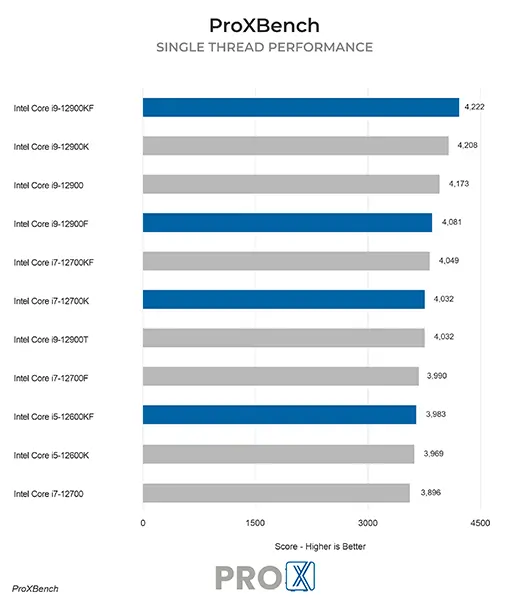
ArcGIS Pro is able to utilize a moderate number of CPU cores – Esri lists a minimum of 2, with 4-10 being recommended – and of course clock speed is also a major factor in performance. That makes a processor like Intel’s Core i9 13900K a fantastic choice. It has 8 “performance” cores that offer some of the highest per-core clock speeds available, along with another 16 “efficiency” cores which are slower but ideal for multitasking and handling background threads. The newer i9 14900K is also great, but only a percent or two faster and unfortunately not available in our most compact workstations
What is the best type of video card (GPU) for ArcGIS Pro?

Basic visualization of project data in ArcGIS Pro doesn’t require a particularly powerful video card – anything with mid-range 3D performance and at least 4GB of onboard memory should do the trick. However, Esri has added support for general-purpose computing on select GPUs to enable features like deep learning and spatial analysis.


If you want to take advantage of that functionality then you need a CUDA-capable graphics card from NVIDIA with a much higher amount of VRAM. The GeForce RTX 40 Series cards are a solid option here, and our ArcGIS Pro workstation can handle models like the GeForce RTX 4070 SUPER 12GB and RTX 4080 16GB. If you have a unique use case that needs even more graphics memory, NVIDIA’s professional RTX A-series cards go as high as 48GB!

How much memory (RAM) does ArcGIS Pro need?

Esri recommends 32GB, so that is the minimum we offer on our ArcGIS Pro workstations. For large projects, or if you run a lot of other software at the same time, 64GB may be optimal. That is where our standard ArcGIS Pro system maxes out, but we have other configurations available which support even more memory if you think your workload requires it.


What is the best type of drive to use for ArcGIS?

A solid-state drive (SSD) is essential for good performance in any application, and for the best experience we recommend a high-speed NVMe model. A mid-size drive should be plenty for your operating system along with ArcGIS Pro and whatever other software you use, and then our recommendation is to have a second SSD – which doesn’t need to be as fast – for storing your projects and other data files. This way your data isn’t directly impacted if you ever need to reinstall the OS, and in a pinch you could remove the storage drive and move it to another system if that was ever necessary.


What sort of drive is best for data storage and backup?

Since SSDs are still more expensive than platter drives per GB, for long term storage and backup we recommend using a traditional hard drive or even an external drive array. Network attached storage systems are a great way to go for that, as they can be shared between multiple workstations and usually offer features to provide some level of data redundancy (protection against losing files if one of the drives dies).


Frequently Asked Questions

ProX PC's Maven workstations stand out for their exceptional performance and versatility. They feature high-end components, providing powerful computing capabilities for demanding tasks. The Maven workstations are designed with flexibility to scale, allowing for extensive customization to meet user-specific needs.

Absolutely! Over the years we have helped quite a few of our customer make the move from Mac to PC. In fact, it is a large enough number that we have a dedicated Need help moving from Mac to PC? page to answer some of the more common questions we receive.

Yes, we offer customizable solutions tailored to your specific requirements. Whether you need extra GPU power, additional RAM, or specialized storage solutions, we can build a workstation that meets your exact needs.

Yes, our workstations are designed with upgradeability in mind. You can easily upgrade components such as the GPU, RAM, and storage to keep up with evolving technology and increasing demands.

We provide comprehensive support, including technical assistance, troubleshooting, and warranty services. Our team is dedicated to ensuring your workstation operates at peak performance and addressing any issues that may arise.

You can contact us through our website's contact form, call our customer support-(011-40727769), or email us at sales@proxpc.com. Our team is ready to help you with any questions or to help you place an order.

Need Help? We're here to help.

Unsure what to get? Have technical questions? Contact us and we'll help you design a custom system which will meet your needs.

ProX PC
Blogs

Read all Blogs

Select your Platform:

Why you should buy from ProX PC

Every ProX PC is unique

Our workstations are extensively customisable as per your requirements which makes your ProX PC Workstation PC unique.

Stress Tested

Our Workstation PCs are stress tested with advance burn-in test techniques so as ensure that you get reliability and performance.

Upto 3 Years of Onsite Warranty

Every Pro X PC comes with standard 3 Years RTB warranty or 3 Years of optional On-Site warranty at minimal cost that covers all your components and gives you peace of mind.

80 Plus Quality Checks

To ensure that our Workstation PC exceeds the industry quality standards we have more than 80 quality check points in place so that you get best of the best.

Performance Grade Cooling

Pro X PC Workstations are equipped with performance cooling solutions so that you could peak your components without stressing them out.

Lifetime Tech Support

Even when your parts warranty expires, we continue to answer your questions and even fix your computer with no labor costs.

Chat with us
