
Like most software developers, Agisoft maintains a list of system requirements for Metashape that can be used to help ensure the hardware in your system will work with their software. However, most “system requirements” lists tend to cover only the very basics of what hardware is needed to run the software, not what hardware will actually give the best performance. In addition, sometimes these lists can be outdated, list old hardware revisions, or simply outright show sub-optimal hardware.
Agisoft has done a better job with their list of system requirements than most, but we have also put together our own benchmark for Metashape and taken the time to perform testing to determine what hardware runs the best. Based on that, we have come up with our own recommended hardware list – as well as specific configurations tailored with this advice in mind.
What happened to Agisoft PhotoScan?
Metashape is simply a new name for Agisoft’s photogrammetry application, formerly known as PhotoScan. The underlying application and functionality is still the same, it has just been rebranded – and, of course, it is being continually updated and improved too.
How does Agisoft Metashape utilize the CPU?
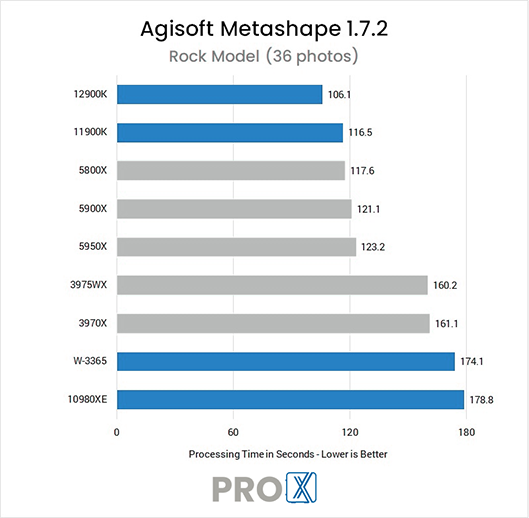
Each step in the Metashape workflow utilizes the CPU differently – some depending only on clock speed, others favoring more cores, but as of Metashape 1.7.2 it seems that extremely high core count processors are not well suited to this application. However, mainstream processors from both Intel and AMD do well.
What is the best CPU for Agisoft Metashape?
Intel’s latest Core flagship, the Core i9 14900K 24 Core, should be the fastest CPU for Metashape – though even the i7 14700K will do extremely well here. Both are faster than the previous winner in our benchmark, the i9 12900K. AMD’s Ryzen 7000 Series processors perform quite nicely too, if you prefer that brand.
Another thing worth mentioning here is that there is a setting in the Metashape Preferences which we have found to usually lower performance and sometimes lead to crashes. We have a full article about it, linked to below, but the short story is that you will want to visit Tools -> Preferences -> GPU whenever you install or update Metashape. There, make sure that all your GPUs are selected and that the option to use the CPU during GPU processing is disabled (un-checked). As backwards as it may seem that improved performance slightly on average, in our testing, though you can always run your own tests with it both ways to see how your specific hardware fares.
Is the CPU or GPU more important for Metashape?
Metashape needs a balance of both the CPU and GPUs (video cards), and the usage of each varies across the different steps involved in using the application. The first two major steps, Align Photos and Build Dense Cloud, are the only core parts of the Metashape workflow to use video cards – but those steps can accounts for 50% or more of the total processing time, so the GPUs are extremely important to performance. Build Dense Cloud also uses multiple CPU cores to good effect, but the Build Mesh step is heavily dependent on clock speed; lowering that too much will hamper performance. You can read more both CPU and GPU scaling in the articles linked to on the right.
Each step of the way – from aligning photos and building the dense cloud to creating the mesh and texture – our workstations have the power to allow you to complete your work faster than ever before.
