
Like most software packages, there is a list of system requirements (including a detailed list for video cards) that can be used to help ensure the hardware in your computer will work with their software. However, most “system requirements” lists tend to cover only the very basics of what PC hardware is needed to run the software, not what hardware will actually give the best performance. In addition, sometimes these lists can be outdated, list old hardware revisions, or simply outright show sub-optimal hardware.
Because of how inconsistent those lists can be, we’ve taken the time to perform testing to determine what hardware runs SOLIDWORKS the best. Based on this testing, we have come up with our own list of recommended hardware.
What is the best CPU for modeling in SOLIDWORKS?
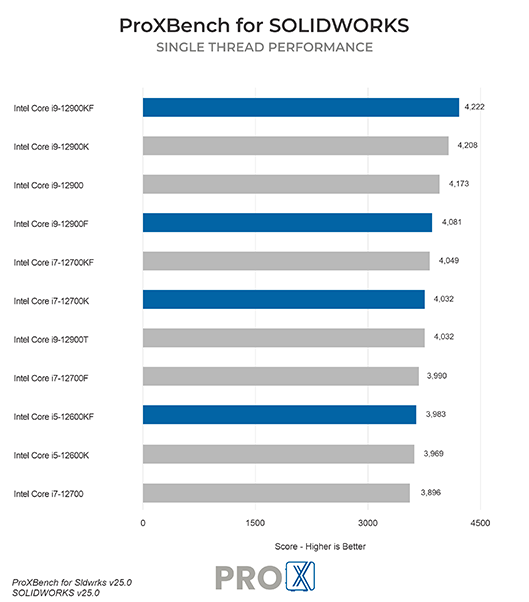
Intel’s Core i7 14700K is our go-to recommendation for most SOLIDWORKS users. General modeling tasks in SOLIDWORKS – such as opening and saving files, rebuilding assemblies, and rotating models – run the fastest with a CPU that has a high operating frequency. This model has high clock speeds as well as improved per-core performance, and adds a few “efficient cores” for handling background tasks and multithreading while the main cores focus on your active workloads. If you want a little more power, the Core i9 14900K boosts clock speeds further and adds some extra efficiency cores for improved multi-tasking.
What is the best CPU for simulation in SOLIDWORKS?
Intel’s Xeon W9-3475X 36 Core is a powerhouse for simulation workloads, which are still sensitive to clock speed but can also scale with additional CPU cores. They also tend to be sensitive to memory bandwidth, and may need more system RAM overall. Because of that, Intel’s higher core count Xeon W processors are ideal choices, especially for FEA and Flow simulations, while still offering good performance for general modeling tasks in SOLIDWORKS. The additional cores also improve rendering performance with PhotoView 360, but if that is your main focus then an even higher core-count CPU like AMD’s Threadripper PRO line will be faster yet.
Does having more CPU cores improve SOLIDWORKS performance?
Modeling and working with assemblies in SOLIDWORKS is not able to utilize more than a handful of cores. In our testing, we found that processors with a high operating frequency will give you the best overall performance for general modeling tasks. Simulation and rendering, however, can see moderate to large performance gains with a higher core count. That is why we use Intel Xeon W CPUs with up to 32 cores for our Simulation workstation.
Do I need a Xeon CPU for SOLIDWORKS?
Some Intel Xeon processors offer much higher core counts than the mainstream Core models, along with higher memory capacities and sometimes support for additional instruction sets. Those features together can improve performance in rendering and certain types of simulation. However, Xeon CPUs are almost always clocked lower than the Core i7 and i9 CPUs – which means that you would be giving up a small amount of performance for general modeling tasks. We offer systems based on both platforms, depending on which aspects of SOLIDWORKS are most important to you – and which better fits your budget.
Should I get an overclocked CPU for SOLIDWORKS?
In general, we do not recommend overclocking for any professional workstation. Typically, the modest performance gains are not worth the downsides associated with overclocking which can include instability, shorter hardware lifespan, and potential data inaccuracies.
A SOLIDWORKS workstation needs to be quick and agile, allowing you to complete your work without interruption. Whether modeling parts or running simulations, our systems have been optimized to allow you to complete your work with minimal disruption.
