
Like most software developers, Adobe maintains a list of system requirements for Premiere Pro that can be used to help ensure the hardware in your system will work with their software. However, most “system requirements” lists tend to cover only the very basics of what hardware is needed to run the software, not what hardware will actually give the best performance. In addition, sometimes these lists can be outdated, show old hardware revisions, or simply contain sub-optimal hardware.
Because of how inconsistent these lists can be, here at ProX PC we run and publish our own set of extensive hardware benchmarks to ensure that the systems we sell are perfectly tailored for Premiere Pro. Even better, you don’t have to take our word for what to buy, you can browse and examine all our testing in detail in our Premiere Pro hardware articles. Based on all our testing, we have our own list of recommended hardware for Premiere Pro. But first, we have a short FAQ with general questions we get asked a lot.
The processor (or CPU) is one of the most important pieces of a Premiere Pro workstation. While GPU acceleration is gaining traction, right now your choice of CPU is usually going to make a much larger impact on overall system performance. However, be aware a CPU that is theoretically more powerful is not always better since there is a limit to the number of cores that Premiere Pro can effectively take advantage of. This is one of the reasons why an expensive dual Xeon workstation is no longer a good choice for Premiere Pro. With the core counts available in modern CPUs, a relatively standard workstation CPU will easily outperform a dual Xeon at a much lower cost.
What CPU is best for Premiere Pro?
The best CPU for Premiere Pro depends heavily on what you will be doing and your budget. For workloads that are primarily using H.264 and H.265 (HEVC), Intel’s Core i9 14900K does a great job – thanks to its built-in QuickSync functionality – and is very reasonably priced. When working with RED footage, on the other hand, AMD’s Threadripper 7970X and 7980X top the charts. And as new models come out these may be usurped, so check our CPU performance articles (linked below) for the latest information.
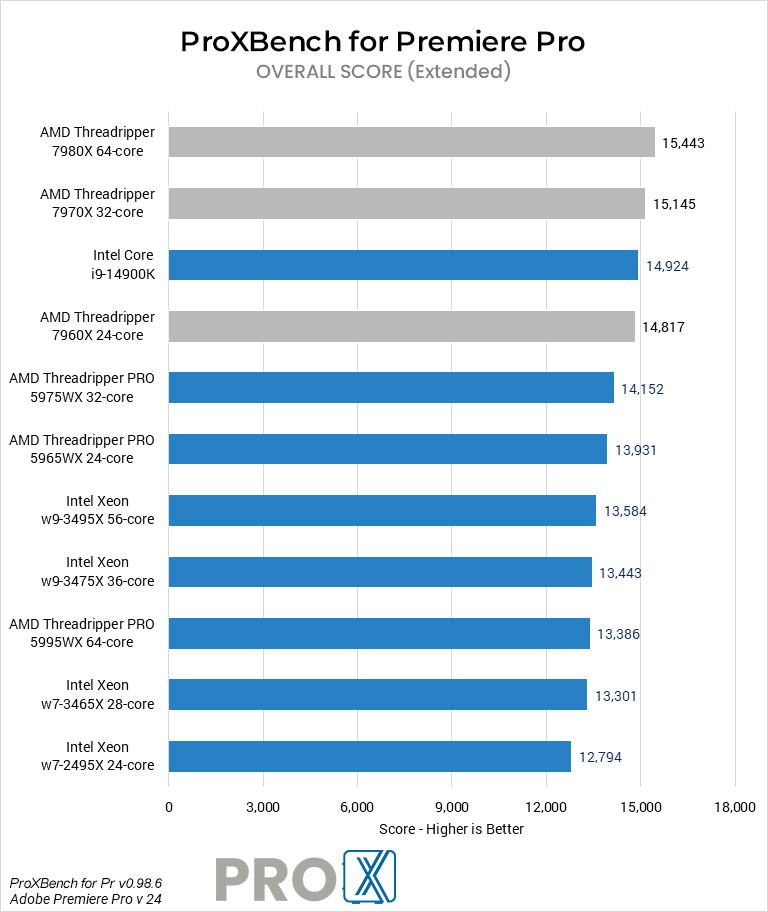
Do more CPU cores make Premiere Pro faster?
To a certain extent, more cores should improve performance although this is more true for exporting than it is for live playback. However, Premiere Pro doesn’t scale perfectly with higher core counts so extremely high core count systems such as dual Xeon workstations tend to do worse than a single CPU workstation due to their lower per-core performance.
In addition, keep in mind that scaling is not universal and can be different depending on whether you use an Intel or AMD processor. Because of this, we highly recommend that you look at straight benchmark performance for different CPUs rather than trying to pick a CPU based on core count (or any other specification) alone.
Does Premiere Pro work better with Intel or AMD CPUs?
At the moment, AMD is stronger in terms of live playback and exporting performance in Premiere Pro in most cases. However, Intel’s Core processors (particularly the newer 13 and 14th Gen models) are great options as they perform close to a similarly-priced AMD Ryzen CPU, but include Quick Sync which can be used to process H.264 and HEVC media rather than relying on the GPU to do those tasks. This frees up the GPU to be used for processing GPU-accelerated effects, debayer R3D footage, etc.
Whether you work with H.264, MP4, ProRes, CineForm, RED, or any other codec, our custom built workstations are optimized to give you the best performance when editing and exporting in Premiere Pro.
