
Like most software developers, Adobe maintains a list of system requirements for Lightroom CC that can be used to help ensure the hardware in your computer system will work with their software. However, most “system requirements” lists tend to cover only the very basics of what hardware is needed to run the software, not what hardware will actually give the best performance. In addition, sometimes these lists can be outdated, show old hardware revisions, or simply contain sub-optimal hardware.
Because of how inconsistent these lists can be, here at ProX PC we run and publish our own set of extensive hardware benchmarks to ensure that the systems we sell are perfectly tailored for Lightroom. Even better, you don’t have to take our word for what to buy, you can browse and examine all our testing in detail in our Lightroom hardware articles. Based on all our testing, we have our own list of recommended pc hardware for Lightroom.
The processor (or CPU) is one of the most important pieces of a Lightroom workstation. While GPU acceleration is gaining traction, right now your choice of CPU is usually going to make a much larger impact on overall system performance. However, be aware a CPU that is theoretically more powerful is not always better since there is a limit to the number of cores that Lightroom can effectively take advantage of. In many cases, spending more money can actually result in worse performance so it is more important to get the right CPU over a more expensive one.
What CPU is best for Lightroom ?
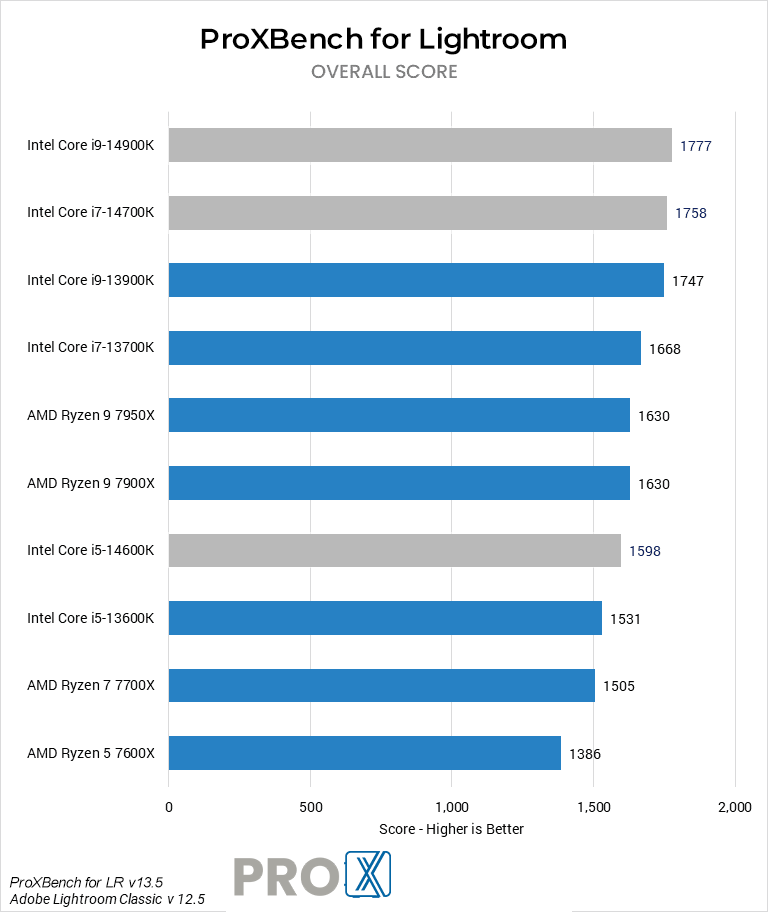
Currently, the best all-around CPU for most Lightroom tasks is Intel’s Core i9 14900K. For purely exporting, a higher core count processor like AMD’s Threadripper PRO can be a little faster – but for a much higher price and reduced performance in other parts of the workflow.
Do more cores make Lightroom faster?
With the launch of Lightroom , Adobe made great strides in being able to effectively utilize higher core count CPUs. However, having a high number of cores (more than ~8) typically only helps with a few tasks like exporting and generating previews. In most cases, the CPU frequency and underlying architecture makes a bigger impact than the raw number of cores.
Does Lightroom work better with Intel or AMD CPUs?
Because Lightroom is largely dependent on per-core performance, the best CPU for this application has gone back and forth between AMD and Intel frequently over the years. As shown in the chart to the right, Intel’s 12th Gen Core processors are currently in the lead – followed closely by AMD’s Ryzen 5000 Series. This is likely to change as each new generation of processors from Intel and AMD are released, though, so if you have any questions about the latest updates please contact our consulting team.
Lightroom has a lot of time-consuming tasks but also requires a responsive system while correcting photos. Our workstations have been optimized to give you the best performance in both respects.
