
Like most software developers, Adobe maintains a list of system requirements for After Effects that can be used to help ensure the hardware in your system will work with their software. However, most “system requirements” lists tend to cover only the very basics of what hardware is needed to run the software, not what hardware will actually give the best performance. In addition, sometimes these lists can be outdated, show old hardware revisions, or simply contain sub-optimal hardware.
Because of how inconsistent these lists can be, here at ProX PC we run and publish our own set of extensive hardware benchmarks to ensure that the systems we sell are perfectly tailored for After Effects. Even better, you don’t have to take our word for what to buy, you can browse and examine all our testing in detail in our After Effects hardware articles. Based on all our testing, we have our own list of recommended hardware for After Effects.
The processor (or CPU) is one of the most important pieces of an After Effects workstation. While GPU acceleration is gaining traction, right now your choice of CPU is usually going to make a much larger impact on overall system performance. However, the way that After Effects uses the CPU means that it is difficult to be sure of how a given processor will perform just from looking at clock speed and core count – which is exactly why we perform testing on a wide range of hardware.
Adobe recently introduced a feature to After Effects called Multi-Frame Rendering (MFR) which changed how effectively AE is able to use multi-core processors. We’ll cover some of the basics here, but for more details you may want to refer to this article before spec’ing out a new workstation.
What CPU is best for After Effects?
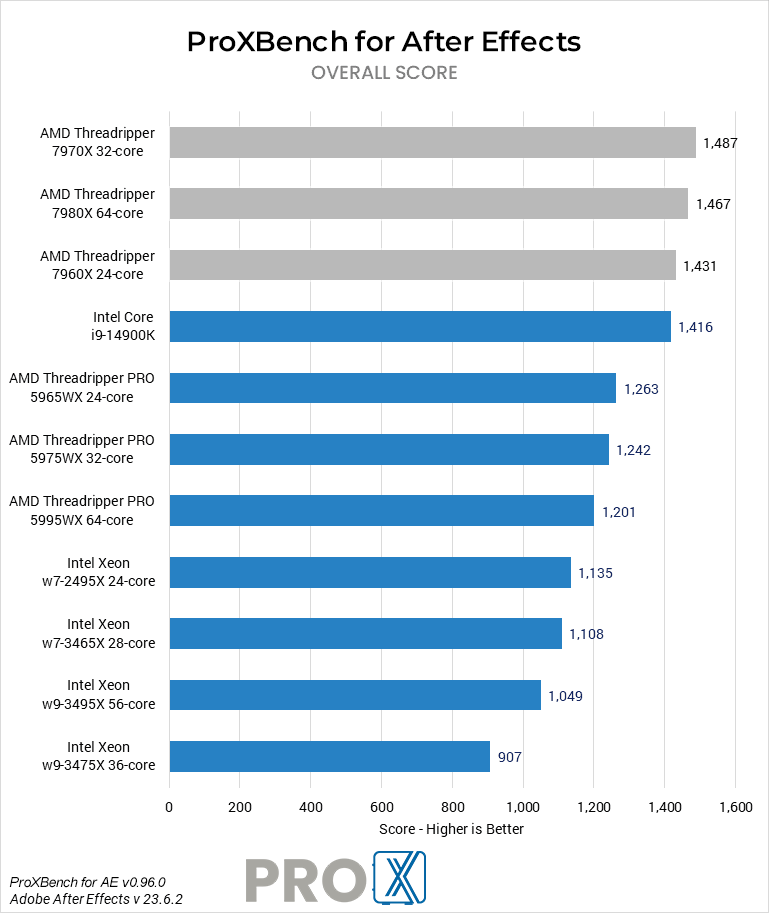
For many users, Intel’s Core i9 14900K and i7 14700K are going to offer the best value in After Effects and come in about 10% ahead of AMD’s comparable Ryzen models. In single- and lightly-threaded workloads, these CPUs are faster than the more expensive AMD Threadripper or Intel Xeon W CPUs – but the Threadripper takes the lead in AE’s new Multi-Frame Rendering mode.
Additionally, platforms like Threadripper and Xeon can allow for higher RAM capacities than the more mainstream Core and Ryzen models. In workloads with higher resolutions or longer timelines, the option for more memory (and thus more cached frames) will likely be more important.
The best option for both high performance and higher memory capacity is AMD’s Threadripper 7000 Series. These can support up to 512GB of RAM, and have overall benchmark scores in After Effects that edge out the less expensive CPUs mentioned above. The highest core count Threadripper chips are best for multi-frame rendering, but lose out on some speed in other areas of After Effects. The trade-off for any of those chips this is a larger and more expensive workstation – but for some users, that will be worth it for the added capabilities.
Do more CPU cores make After Effects faster?
Prior to the introduction of multi-frame rendering, After Effects didn’t scale particularly well – primarily using a single core, and making clock speed much more important than core count. However, MFR changed that by allowing multiple frames to be rendered at the same time… as long as the system has sufficient resources (available cores, memory, and GPU time / VRAM). Clock speed is still important, but the number of cores and other hardware is becoming a bigger factor. If you are using the Cinema 4D renderer, or a third-party product like BG Renderer, those can potentially make even better use of additional CPU cores.
Why don’t you offer dual Xeon? Isn’t it faster for After Effects?
After Effects used to make great use of high core count systems (including dual Xeon) but starting with AE CC 2015 most tasks no longer benefit from having a high number of CPU cores. This is largely due to the fact that Adobe removed the “render multiple frames simultaneously” feature in part due to the fact that they are starting to integrate GPU acceleration. While it used to be that more cores = faster, since higher core count CPUs run at a lower speed a CPU with around 8 cores will be faster than a higher core count CPU or even a dual CPU setup. Multi-frame rendering brought some of this back, but from our test data it doesn’t scale well enough for a dual CPU workstation to give an advantage over a single, high core count CPU.
After Effects can be a very resource-intensive program, but our custom built workstations are designed to give you the power you need to edit and iterate quickly and efficiently.
