
Like most software developers, the Blender Foundation maintains a list of system requirements for Blender that can be used to help ensure the hardware in your computer system will work with their software. However, most “system requirements” lists tend to cover only the very basics of what hardware is needed to run the software, not what hardware will give the best performance. In addition, sometimes these lists can be outdated, show old hardware revisions, or simply contain sub-optimal hardware.
Because of how inconsistent these lists can be, here at ProX PC we run benchmark tests on a wide range of hardware and publish our results to ensure that the systems we sell are perfectly tailored for your workload. Based on all our testing, here is our list of recommended hardware for a Blender PC.
How does Blender utilize the CPU?
The processor, or CPU, is one of the most important pieces of a Blender workstation. The CPU handles tasks such as modeling, animation, physics simulations, and rendering. While GPU rendering is significantly faster in Blender, the CPU can still provide increased performance.
What CPU is best for Blender?
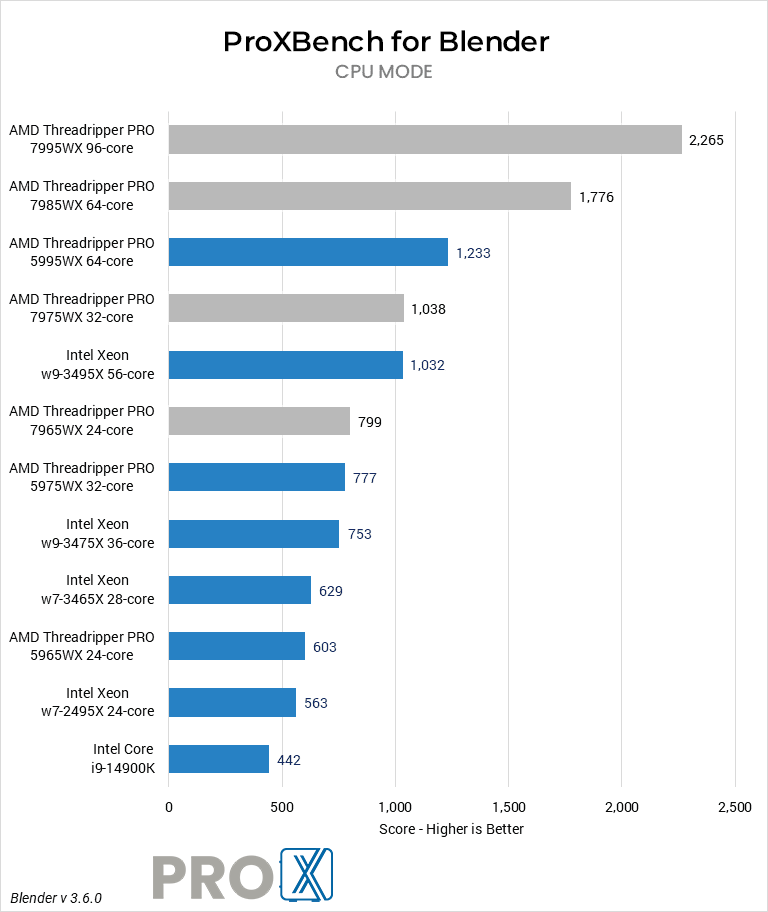
Currently, the overall fastest CPU for Blender depends on your specific workflow. Modeling and animation tasks are better on a single, fast core. While rendering is better with large numbers of cores. Simulations are somewhat split. Cloth and rigid body simulations only use a few fast cores, while fluid simulations will use lots of cores.
If you will be doing a lot of fluid simulations, or relying on CPU rendering, then the current fastest CPU is AMD’s Threadripper 7995WX. It offers 96-cores, and support for up to a massive 1TB of RAM!
If you are focused on modeling and animation then Intel’s Core i9 processor paired with the new DDR5 RAM is the best option, with the Core i7 not far behind.
Does CPU clock speed improve Blender workflows?
High clock speeds have the greatest impact on modeling and animation, especially as projects become more complex.
Do more CPU cores make Blender faster?
More cores will speed up some actions such as rendering and fluid simulations, so if those tasks take up a lot of your time then maxing out the number of cores you can afford would be ideal. Additional cores will not speed up modeling and animation, though, as those are single- or lightly-threaded.
Does Blender work better with Intel or AMD CPUs?
At the moment, AMD has a lead in rendering and other well-threaded workloads due to their high CPU core counts. However, Intel’s processors tend to offer higher per-core clock speeds – making them better for modeling tasks.
Our recommended systems for Blender are designed to allow you to focus on your art – whether modeling, animation, rendering, or anything else – without running into hardware bottlenecks.
