
Chaos Group posts basic system requirements for each version of their V-Ray rendering plugin on their official website, as well as the standalone variant. However, the focus in each case is on minimum requirements – not what performs the best. Moreover, there are actually multiple parts of V-Ray: CUDA, RTX, and CPU, which each use different hardware in a computer. Because of this situation, we have taken the time here at ProX PC to perform our own testing to determine what hardware runs V-Ray the best. Based on this testing, we have come up with our own list of recommendations.
How does V-Ray utilize the CPU?
V-Ray CPU (formerly called Adv) is the ‘normal’ version of V-Ray, and it uses the CPU to perform ray tracing and rendering. It scales very well with both clock speed and core count and even across multiple physical CPUs in a single workstation. If that is the version you plan to use, you will want to spend the bulk of your funds on a powerful CPU. This should scale well to a dual CPU workstation, but if you need that sort of horsepower (and can afford it), you might be better off with multiple computers or rendering servers running in a networked rendering configuration.
On the other hand, V-Ray CUDA began its life as a GPU-based rendering engine. We talk more about that in the next section, but it is worth mentioning that as of V-Ray 3.6 the CPU can now be used alongside the GPU(s) if you wish. Before this, only a basic CPU was needed for V-Ray – but now there is a good argument for getting a more powerful processor, especially if you first max out the number of video cards. We have articles looking at how CPU performance scales alongside GPUs in V-Ray, if you want more information. Keep in mind that the Hybrid CPU+GPU mode uses CUDA, therefor you do not get the benefit of the RT cores available in modern GPUs to accelerate ray tracing.
What is the best CPU for V-Ray?
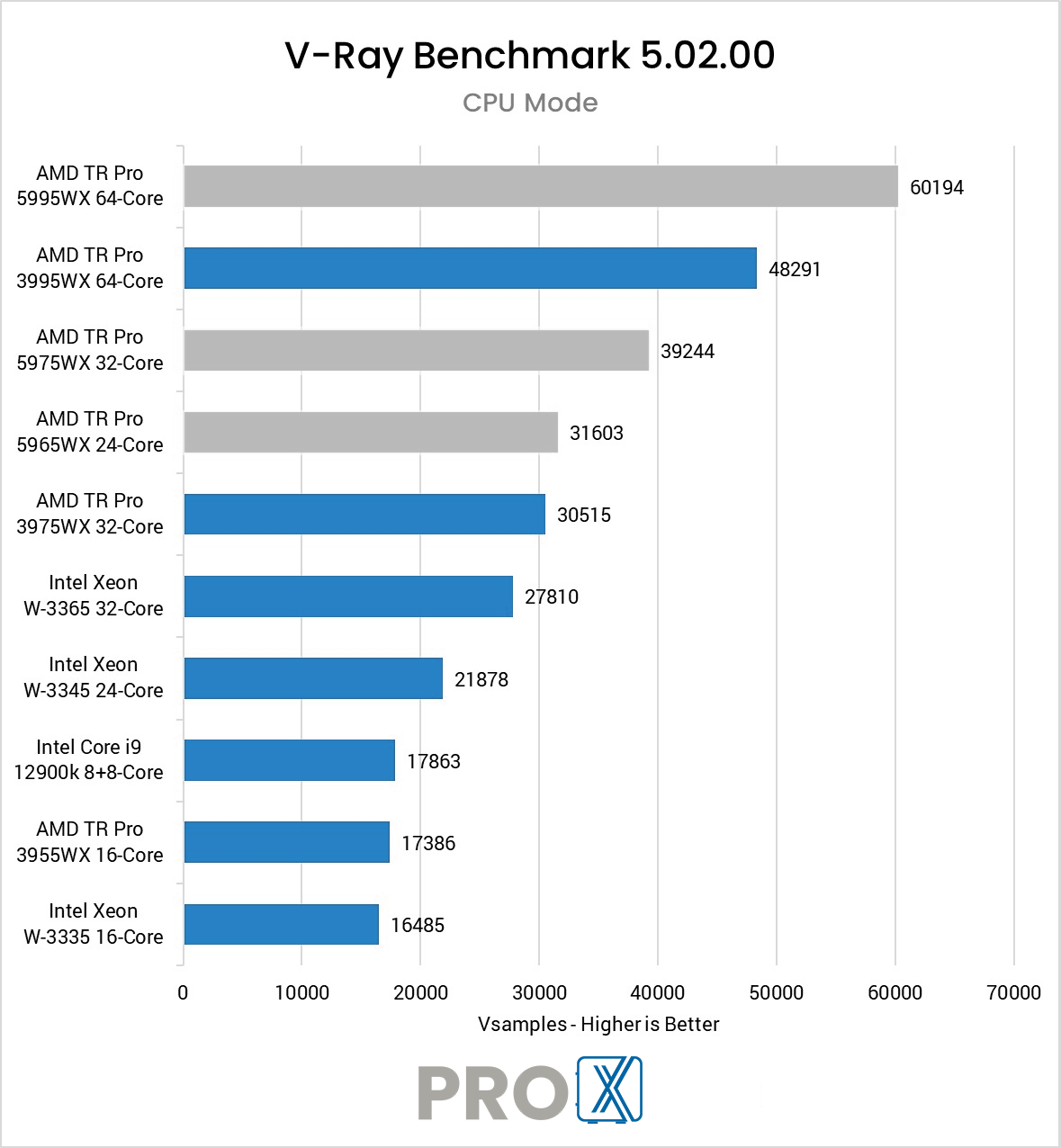
If you are planning to use the traditional CPU rendering capabilities of V-Ray, then you will want a high core count processor. The top workstation option for that is currently AMD’s Threadripper PRO line, and specifically the biggest model they offer: the Threadripper PRO 7995WX 96 Core. With 96 cores and greatly improved per-core performance, AMD has taken an even further lead over Intel in workstation processor performance – especially with well threaded applications like rendering. Because of its fairly high turbo speeds, this CPU also does well with modeling and animation.
If your focus is more on the GPU rendering side of things, then any high PCI-Express lane count processor will do well. If you are going to use V-Ray GPU, then packing in as many video cards as possible is the name of the game. To that end, processors which support a lot of PCI-Express lanes are the way to go… and things like core count matter a lot less. PCI-E lanes is another strong point of AMD’s Threadripper PRO end EPYC lines, but you likely wouldn’t need the highest core count model. Chaos Group does recommend 6 cores per video card, though, and keeping the clock speed high helps too.
Do I need a Xeon CPU for V-Ray?
In the past, Intel’s Xeon CPUs were more robust than their Core series counterparts and didn’t really have a direct competitor. Today, however, AMD’s Threadripper PRO line offers similar or even superior features in terms of core count, PCI-Express lanes, and memory bandwidth – so we prefer that CPU platform for our rendering-focused workstations and server nodes.
What are the advantages and disadvantages of a dual CPU workstation for V-Ray?
The main advantage of a dual CPU workstation was that it allowed you to have an extremely high number of CPU cores, which in pure CPU rendering engines (like older versions of V-Ray) substantially impacted performance. In years past, it could give you anywhere from two to three times the render performance compared to a single CPU workstation. However, since the individual cores in most dual Xeon CPUs run at relatively modest speeds this meant that you would have much lower performance for other, non-rendering tasks compared to a single CPU workstation at a lower cost.
AMD now offers single CPUs which have nearly as many cores as a dual Xeon configuration, but at a lower price. These Threadripper PRO processors, as AMD brands them, are a great choice for heavily threaded CPU applications like rendering – especially if you aren’t doing work that is single-threaded (which like Xeons is their weak spot, with lower per-core clock speeds). They also offer a lot of PCI-Express lanes, making them ideal for GPU-based rendering with multiple video cards.
Where should I prioritize my budget to get the best rendering performance in V-Ray?
Chaos Group has two different versions of their rendering engine: V-Ray CPU and V-Ray GPU (previously V-Ray Adv and V-Ray RT, respectively). The first is a CPU-based rendering engine that benefits greatly from having a high number of CPU cores. In fact, it scales well with more cores which makes a high core count CPU excellent for performance. For that version we strongly recommend a Threadripper Pro platform, which we offer in both tower and rackmount form factors.
On the other hand, V-Ray GPU uses GPUs – as the name indicates – to perform the rendering calculations. If that is your focus, we recommend maxing-out the speed and quantity of video cards – within your budget and available space – before worrying about the CPU. However, starting in V-Ray 3.6 the CPU can be used alongside the GPUs to further boost rendering speed. Chaos Group calls this Hybrid Rendering, so if you are using 3.6 or higher the CPU should still be a factor in your purchasing decision. Check out this article for more information.
The custom built workstations we build for V-Ray have been tailored for blazing-fast rendering and rock-solid stability. They can be further configured for either CPU- or GPU-based rendering… or both!
