
Create interactive, real-time experiences with ease using our powerful systems. Spend more time creating and less time waiting.
Game design involves a lot of different disciplines, and thus a lot of different software packages. There are game engines themselves, such as Unreal Engine and Unity, along with 3D design software like 3ds Max, Blender, and ZBrush – and so much more! Most software developers maintain lists of system requirements for these various applications, but those lists tend to cover only the very basics of what hardware is needed to run the software rather than what hardware will give the best performance. Sometimes these lists can be outdated, too, or simply contain sub-optimal recommendations.
Because of how inconsistent these lists can be, here at ProX PC we do more in-depth research – including running and publishing our own set of hardware benchmarks for some software packages – to ensure that the systems we sell are perfectly tailored for all aspects of game design. Based on all our testing and collective experience, we have put together the following information about recommended hardware for game dev workstations.
How does game development utilize the CPU?
The processor (or CPU) is one of the most important pieces of a game development PC. The CPU handles all the hard development tasks such as compiling shaders and code, 3D sculpting, and light baking. Some of these tasks are beginning to be offloaded to the GPU, which we will talk about more in the next section, but the CPU is still a huge factor for many aspects of performance.
What CPU is best for game development?
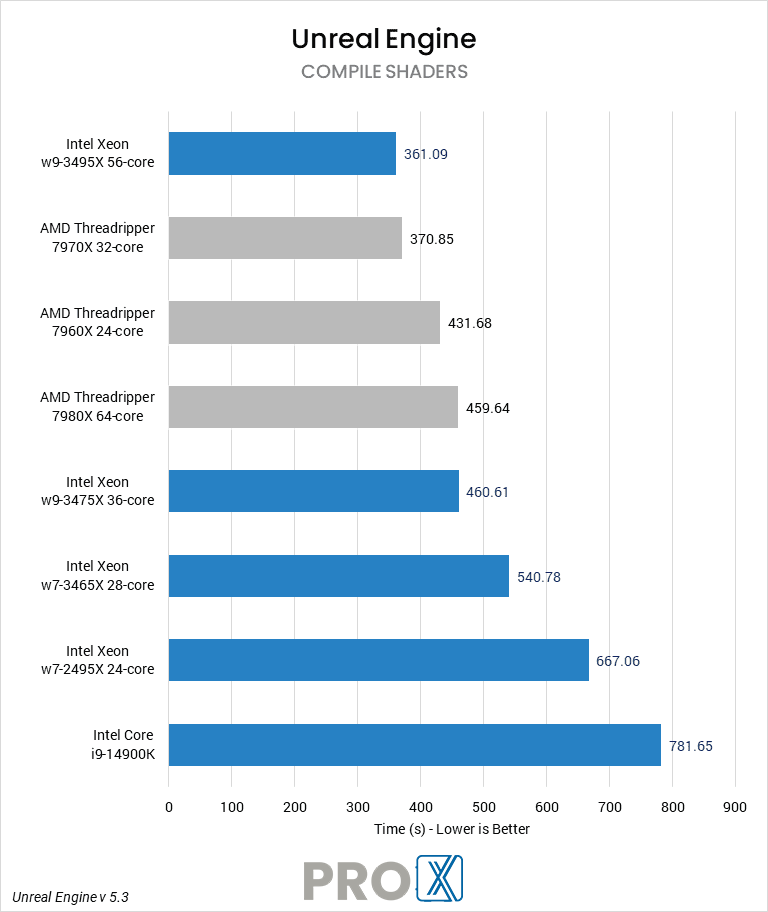
This really depends on which part of the game design workflow you focus on. For example, the overall best CPUs for game development in Unreal Engine are currently AMD’s Threadripper 7000 Series. Most development tasks in Unreal Engine are multi-threaded and scale very well on CPUs offering a lot of cores. Not only that, users compiling source code will benefit from the quad-channel RAM available on this class of workstations.
However, many users may not see enough of a speed boost from such a CPU for their particular workflow – especially considering how much those cost. Studios working on smaller games or using a dedicated compile server, or individual users more focused on asset creation, may prefer to use a less expensive option such as the Intel Core i7 14700K or i9 14900K. These CPUs offer a good number of cores, while also offering high single-core clock speeds that can aid in 3D modeling application performance.
Do more CPU cores make game development faster?
On the game engineering side of things, the more CPU cores a system has the faster it will be able to compile code, compile shaders, or bake lighting. However, for more artistic workloads the core count tends to be less important – at least past a certain point – and clock speed / performance per clock is a bigger factor.
Does CPU clock speed improve game dev workflows?
Just as with the question of CPU core count above, this depends heavily on what part of game design the system will be used for. While high clock speeds are sought after by game players, development inside game engines like Unreal Engine won’t see as much benefit. However, many 3D modeling applications, such as 3ds Max and Maya, do benefit from higher clock speeds – so for a game artist’s workstation you will want a balance of cores and clock speed.
Does game design work better with Intel or AMD CPUs?
At the moment, AMD has a slight lead due to their high CPU core counts. Intel is definitely a viable option, though, especially for aspects of game design that don’t need as many cores.
How does game development utilize video cards (GPUs)?
The graphics processing unit (GPU) is the chip on a video card that is responsible for rendering each frame that is sent to your monitors. The performance of this chip determines how many models, textures, and effects can be shown on the screen as well as how many frames per second can be displayed. Some engines and editors can offload other tasks to the GPU as well, such as ray tracing for accurate lighting and reflections and a new feature in Unreal Engine which allows the GPU to bake lighting.
What GPU (video card) is best for game development?
As of this writing, the fastest GPU for game dev is the NVIDIA GeForce RTX 4090. However, depending on the target platform and specific workflow, many users will be able to use a more affordable GPU such as the RTX 4080 or 4070 SUPER.

How much VRAM (video memory) does game development need?
The amount of VRAM needed will depend on the target platform and desired quality setting in-engine. Generally speaking, 8GB is plenty for the majority of users.
Will multiple GPUs improve performance in game development?
There is very little use for multiple GPUs. For example, in Unreal Engine the GPU Lightmass feature can use multiple GPUs – but general gameplay would require a customized build of the engine. Other game engines may be better about utilizing multiple video cards, but unless playing or testing at extremely high resolutions there is really no need for more than one GPU.
Does game development run better on NVIDIA or AMD GPUs?
Both NVIDIA and AMD-based cards work well for game development. Currently, the biggest difference is NVIDIA is faster with ray tracing workloads.
Does game development need a “professional” video card?
There is no need for a professional video card, like NVIDIA’s Quadro or RTX A-series, for game development.
The exact amount or RAM needed depends on the size of your project, how many other applications are open, and what specific tasks you work on. Memory usage in development tools like Unreal Engine can quickly shoot up, and having multiple intensive programs running at the same time is quite common in this field, so ensuring that the system has enough RAM is key to keep everything performing smoothly.
How much RAM does game development need?
The amount of RAM needed depends on the specific workflow and software packages you use. For example, Unreal Engine itself can function in a system with 16GB of RAM as long as the projects are small – but larger projects will require 32GB. Many game artists will have several high-end applications open at the same time, though, and would need 64GB or potentially even 128GB of RAM.
The types of drives used for game development are often overlooked. In general, speed is very important for loading and saving projects – but size is also a consideration for the large number of files used by developers.
What storage configuration works best for game development?
Projects in game engines like Unreal Engine projects can become quite large, very quickly. 30-40GB projects are common, and 100+ GB projects aren’t unheard of. As such, having both large and fast storage is highly recommended. We recommend having one 500GB NVMe drive for the OS and applications, and another 1 or 2TB NVMe drive for your project files. Separating things like that can help protect your important data in the event that the OS needs to be reinstalled, though of course regular backups to external drives or networked storage is important too.
That should be enough for many users, however artists will also want a larger drive for their material and reference libraries. This can be a slower (and cheaper) SATA SSD or even platter hard drive.
Should I use network attached storage for game development?
Network-attached storage is a great option for game studios that need a central repository for shared assets! It has become more common for workstation motherboards to have 10Gb Ethernet ports, allowing for network storage connections with reasonably good performance without the need for more specialized networking add-ons. Rackmount workstations and servers often have even faster network connections, often using more advanced cabling than simple RJ45, making options like software-defined storage appealing.
ProX PC's Maven workstations stand out for their exceptional performance and versatility. They feature high-end components, providing powerful computing capabilities for demanding tasks. The Maven workstations are designed with flexibility to scale, allowing for extensive customization to meet user-specific needs.
Absolutely! Over the years we have helped quite a few of our customer make the move from Mac to PC. In fact, it is a large enough number that we have a dedicated Need help moving from Mac to PC? page to answer some of the more common questions we receive.
Yes, we offer customizable solutions tailored to your specific requirements. Whether you need extra GPU power, additional RAM, or specialized storage solutions, we can build a workstation that meets your exact needs.
Yes, our workstations are designed with upgradeability in mind. You can easily upgrade components such as the GPU, RAM, and storage to keep up with evolving technology and increasing demands.
We provide comprehensive support, including technical assistance, troubleshooting, and warranty services. Our team is dedicated to ensuring your workstation operates at peak performance and addressing any issues that may arise.
You can contact us through our website's contact form, call our customer support-(011-40727769), or email us at sales@proxpc.com. Our team is ready to help you with any questions or to help you place an order.


Select your Platform:
Our workstations are extensively customisable as per your requirements which makes your ProX PC Workstation PC unique.
Our Workstation PCs are stress tested with advance burn-in test techniques so as ensure that you get reliability and performance.
Every Pro X PC comes with standard 3 Years RTB warranty or 3 Years of optional On-Site warranty at minimal cost that covers all your components and gives you peace of mind.
To ensure that our Workstation PC exceeds the industry quality standards we have more than 80 quality check points in place so that you get best of the best.
Pro X PC Workstations are equipped with performance cooling solutions so that you could peak your components without stressing them out.
Even when your parts warranty expires, we continue to answer your questions and even fix your computer with no labor costs.
