
Like most software developers, Autodesk maintains a list of system requirements for Revit that can be used to help ensure the hardware in your system will work with their software. However, this “system requirements” list only covers the very basics of what hardware is needed to run the software, not what hardware will actually give the best performance. Because of how inconsistent those lists can be, we’ve taken the time to perform testing to determine what hardware run Revit he best. Based on this testing, we have come up with our own list of recommended hardware for Revit.
When it comes to CPUs there are two main specifications that define the capability of a CPU:
The frequency directly affects how many operations a single CPU core can complete in a second (how fast it is).
The number of cores is how many physical cores there are within a CPU (how many operations it can run simultaneously).
Whether a high frequency or high core count CPU is better depends on how well a program is designed to take advantage of multiple CPU cores (often referred to as multi-threading).
What is the best CPU for Autodesk Revit?
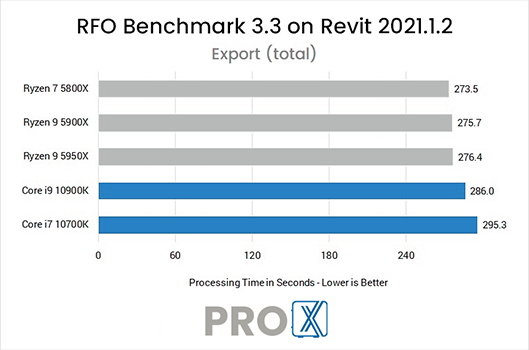
The majority of design tasks in Revit is only able to utilize a single CPU core which makes a high frequency CPU – regardless of the core count – an ideal choice for these tasks. Because of this, our “Modeling & Design” workstation uses Intel’s Core i9 or i7 K-series, both of which offer high clock speeds alongside a good number of cores (for multitasking, etc).
If you want to improve your rendering times, however, we suggest using a CPU with an even higher number of cores. The Autodesk Raytracer (ART) rendering engine included in Revit can benefit greatly from using a CPU with more cores like those found in our “Rendering Optimized” workstation. If you need even higher performance, or if you prefer to use a GPU-based rendering engine instead, check out our other rendering recommended systems.
Does having more CPU cores improve Revit performance?
Designing and modeling in Revit is not able to utilize more than a handful of cores. In our testing, we found that a CPU with a high operating frequency will give you the best overall performance for general modeling tasks. Rendering, however, can see moderate to large performance gains with a higher core count CPU. Revit’s built-in rendering is largely being replaced by GPU-based plug-ins, though, so if rendering is a big part of your workflow please contact our consultants to get a configuration tailored to your specific needs and budget.
Do I need a Xeon CPU for Revit?
In the past, Xeon CPUs were more robust than their Core-series counterparts. Today, however, there is very little functional difference between the two Intel product families for software like Revit. In addition, Xeon CPUs are almost always clocked slightly lower than the Core i7 / i9 CPUs – which means that you will be giving up a small amount of performance to gain a set of features that are typically only useful for servers.
Should I get an overclocked system for Revit?
In general, we do not recommend overclocking for any professional workstation. Typically, the modest performance gains are not worth the downsides associated with overclocking which can include instability, shorter hardware lifespan, and potential data inaccuracies.
ProX PC has performed extensive analysis of Revit to configure workstations that are designed specifically for the needs of Revit users.
